Instant Takeoff · Pilot programme
From drawing to BOQ in hours, not days.
Built for Indian MEP consultants, EPC contractors and plant vendors who bid tenders every week. Send P&IDs, single-line diagrams, GA and services drawings. Get equipment lists, measured quantities and a priced BOQ, every item traceable to its place on the sheet.
Watch · 2 min 24 s
Read the transcript
Every tender comes with a stack of drawings. Someone has to count every pump, valve and instrument by hand, sheet by sheet. Miss one, and it comes out of your margin.
And before that, someone has to read a hundred-page tender, just to decide whether to bid.
SheetTakeoff, from Navbharat Water, does both.
Start a drawing takeoff, and upload a P&ID set as a PDF, or a DXF from your CAD software.
SheetTakeoff reads the project's own legend first, then every drawing against it. Each item gets a confidence score and a box on the drawing. You review the unsure items first, and export the BOQ.
This is a real twenty-five sheet set: eighty-two equipment items, sixty lines, three hundred and thirty-eight instruments and a hundred and twenty valves, each in its own tab.
Click any row, and the drawing jumps to it. You see exactly what was counted, and where.
Items the model is unsure about are flagged in red and amber, so you check those first. Accept, reject or edit, and every change is saved.
Then export a BOQ workbook in Excel, with sections, quantities, and blank rate and item code columns, ready for your price book.
For tenders, choose tender analysis, and upload the document.
SheetTakeoff reads every page, and gives you bid advice with the reasons. Here, a 99-page IIT Kanpur tender: bid, with three clarifications, and the top risks spelled out.
Every eligibility criterion is listed, with your status, the document that proves it, and the page it came from.
And a compliance matrix, clause by clause, with your response and the deviation risk.
Built for water and process plants: P&IDs, not floor plans. Indian tenders, read with page references. Every quantity points back to its place on the drawing.
Try it on your own drawing, at navbharatwater.com/instant-takeoff.
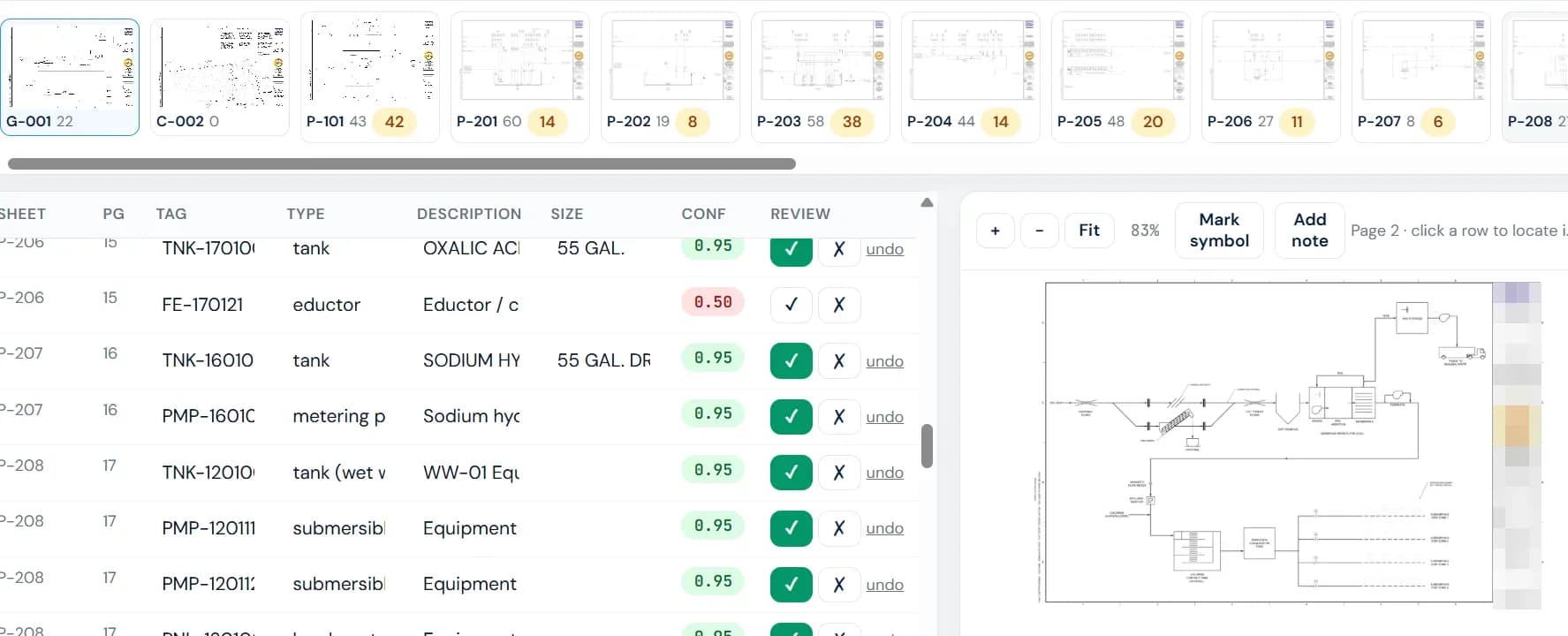
Review screen on a 19-sheet P&ID set: every tag with its confidence, one click to see it on the sheet, accept or reject, export BOQ.
Upload
DWG, DXF, vector PDF, SolidWorks / Plant 3D exports, or scans. Any size, any revision.
Identify
Every sheet classified. Equipment tags, line numbers, instruments, cables and valves read from the drawing and its schedules.
Measure
Pipe and duct lengths by size, fittings, footprints and tank volumes computed from the geometry itself, not estimated.
Review & export
Click any item to see it on the drawing. Approve, then export a BOQ in your own format with DSR / SOR codes.
What accuracy to expect
Native CAD files give exact quantities.
Lengths, areas and counts come from the drawing geometry, never from an AI guess. The model only identifies what each object is. Send DWG or a model export and the numbers are exact; scans are read with vision and flagged for review.
| Input | Item identification | Quantities |
|---|---|---|
| SolidWorks / Plant 3D BOM export | Exact | Exact |
| Revit / IFC | 95%+ | Exact |
| DWG / DXF, well layered | 95–98% | Exact |
| DWG / DXF, unlayered | 85–90% | Exact once identified |
| Vector PDF from CAD | 85–90% | Exact after scale calibration |
| Scanned PDF | 70–90% | ±10% |
Your drawings stay yours. Stored in India, deleted on request, never used to train shared models.
Proven on our own bids. Navbharat Water uses it on live GeM tenders before any customer does.